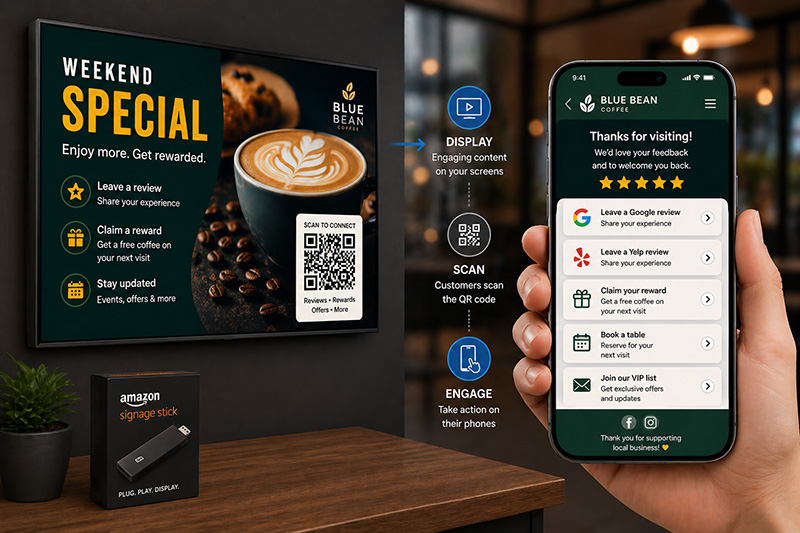
Put your offer on a printed QR code or any TV in your store. Customers scan with their phone to claim it, leave a review, or come back for more - no app needed. Start with paper today and add a screen when you're ready.
Loved your visit?
Scan to review us
How was your visit?
★★★★★
Leave a Google review Tell us privatelyTuesday Treat
20% off all pastries
Today 2-5 PM · Scan to save it
Tuesday Treat
20% off
all pastries · today 2-5 PM
✓ Saved to your phone
Hi! Pick a use case, or type your own question below. Tap FAQ for quick answers.
Use cases
Looking for or ? Or tap for quick answers.
Quick answers - tap a question:
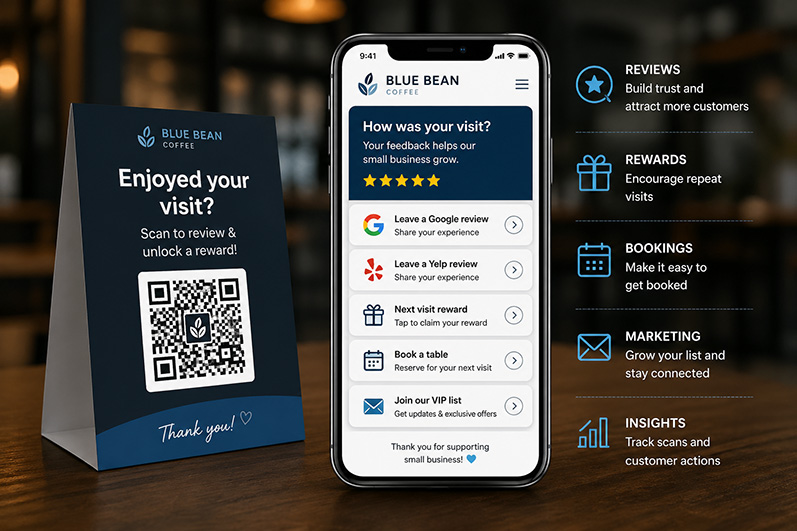
QRSign is digital signage with a QR code on every sign. Customers scan what they see - on a printed QR code or a screen - and take it with them on their phone. You manage it all from one account.
The page customers open after scanning - reviews, offers, menus, feedback. Works from a printed QR code on its own.
Explore QRLink → Add when you're readyMenus, promotions and welcome screens on any TV, each with a QR code. Runs on QRSign Player with an Amazon Signage Stick.
Explore Digital Signage → Optional · BetaManage QRSign from the AI assistant you already use - ChatGPT, Claude, Gemini or Muse. Everything also works in the web app.
Meet Wally →On a printed sign or a screen in your store
With the phone camera - no app to download
The offer, the menu, or a one-tap review
No screen? Start with paper. Have a TV? Use it. Both open the same page.
Create your QRLink page, print the code, and put it on tables, counters, windows or receipts. Customers scan and take it with them.
Plug an Amazon Signage Stick into any TV. Show menus, promotions and welcome screens - each with a QR code customers can scan.
Most owners start with one printed sign and add a screen later. Update your page once and every sign - paper and screen - shows the change.
Your QRLink page is built for action - in your brand, on their phone.
Your QRLink page makes reviewing you on Google one tap, while the visit is fresh.
QRLink for reviews →Unhappy customers can give feedback to you first - so you can make it right before it reaches Google.
Slow-hour deals and seasonal specials, saved on their phone and ready to show at the counter.
See a sample offer →Repeat-visit rewards that turn one-time visitors into regulars.
Today's menu, hours, events and announcements - whatever is on the sign, now in their pocket.
Bookings and loyalty sign-ups - one scan from the sign to done.
Use the web app on its own, or add Wally to the AI assistant you already use. Both work on the same account, so you can switch any time.
Desktop or phone, no AI needed
Available at launch ›Wally Beta in ChatGPT, Claude, Gemini or Muse
Meet Wally ›If customers walk through your door, QRSign works for you.
One location or several - QRSign grows with you.
Every plan includes QRLink pages, digital signage and the QRSign web app. Your plan sets the capacity: pages, screens, storage and users.
No credit card required to start · Cancel anytime · Wally (beta) included at no extra cost
What owners ask before they put up their first QR code.
No. Start with a printed QR code on your tables, counter or window. Add a screen later if you want - it shows the same page, so nothing has to be redone.
No. They scan with their phone camera and your QRLink page opens in the browser.
No. The QR code never changes - you update the page it opens. Printed signs, screens and the phone page all show the change.
No. Everything works in the QRSign web app. Wally is an optional way to manage QRSign from the AI assistant you already use - it's in beta and included at no extra cost.
Any TV with an HDMI port and an Amazon Signage Stick. Plug it in and it runs QRSign Player out of the box.
QRSign is in development and this site is a preview. Accounts open at launch, starting with the free Explorer plan - no credit card required.
Something else? Ask QRSign ↑
Start with paper and one page - free. Add a screen whenever you're ready.
Start freeFree plan · No credit card required · Cancel anytime