Coming soon QRSign is in development. Explore a preview of what's coming.
Wally by QRSign

The AI assistant that markets your business while you run it.

Wally lives inside the AI assistant already on your phone or desktop computer. It drafts your marketing and keeps your screens fresh - you just approve.

Free with every plan You approve everything No credit card to start
W
Wally
Your marketing assistant
Tuesdays are always slow. Any ideas?
How about 15% off all drinks, Tue 2-5 PM? I drafted the offer and the window-display layout.
Sample draft

Tuesday Afternoon Boost

15% off all drinks · Tue 2–5 PM

QRLink page and window-display layout, ready for your approval.

Wally proposes. You approve. Nothing goes live without your tap.

One assistant, every touchpoint.

You talk to Wally in plain words. Start with QRLink or signage - or run both.

You

The owner, in plain words

→
W

Wally

Your AI marketing assistant

→

Content

Pages, offers & playlists

→

Prefer doing it yourself without AI? The QRSign web app gives you full control.

QRLink - Turn Every QR Scan Into Customer Action
A QR code should do more than just open a page. QRLink creates a mobile landing page built for real customer action - reviews, promotions, bookings, loyalty rewards, feedback, and return visits.
No app required. Just scan, engage, and convert every customer visit into measurable business results.
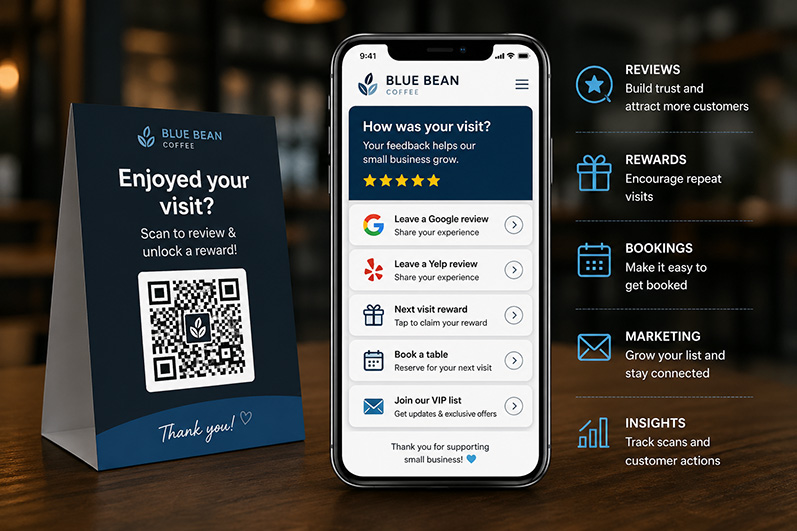
QRLink Mobile Landing Page
QRLink Mobile Pages Reviews, promotions & customer engagement
QRLink + QRSign Player - From Screen Attention to Phone Action
  • Digital signage grabs attention. QRLink turns that attention into action.
  • Promote specials, offers, and events on your screens. Customers scan to review, claim rewards, and stay connected - right from their phones.
  • Create once. Display everywhere. Update anytime.
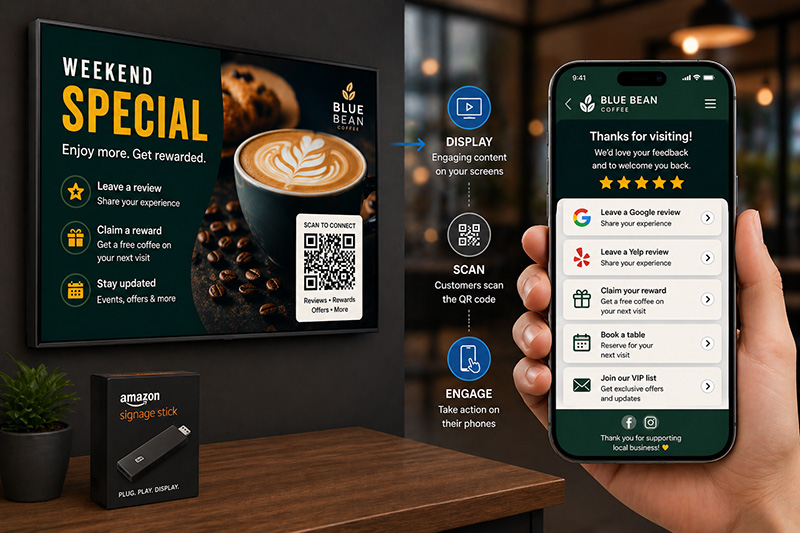
QRLink and QRSign Player
QRLink + QRSign Player Promotions that move from screen to customer action

Up and running in minutes.

Three steps. No tech skills needed.

1

Add Wally

One tap connects Wally to the AI assistant already on your phone or desktop computer. No new app to learn.

2

Tell Wally about your business

A short chat about your hours, your menu, and your slow times. Wally learns how you talk to customers.

3

Approve and grow

Wally drafts review replies, offers, and display content. Nothing goes live until you approve it with a tap.

Two doors in. Wally throughout.

Start with the screens on your walls, or the QR codes on your tables - Wally runs both.

One assistant, the whole marketing job.

Wally quietly handles the marketing work you'd never get to - and checks with you first.

More 5-star reviews

Share a new review with Wally and it drafts your reply in your voice. You approve before anything posts.

Explore QRLink →

Slow-hour offers

Tell Wally about your quiet stretches and it drafts timely offers to bring people in when you need them most.

Customers who come back

Repeat-visit rewards and VIP offers that turn one-time visitors into regulars - drafted by Wally, approved by you.

Explore QRLink →

Always-fresh displays

Your in-store screens always show the current offer - updated from the same conversation, no extra work.

Explore signage →

A weekly briefing

Coming soon. A weekly briefing on what happened, what worked, and what Wally suggests next - in plain words.

Answers when you ask

How-to, troubleshooting, billing questions - just ask. Support lives inside Wally, not in a ticket queue.

What Wally did this week.

Not a chatbot - a coworker. Here's what a typical week with Wally on the job looks like.

Illustrative example - your week with Wally follows your business.

Thursday

Screen checkup

Wally pulled a screenshot of the lobby display - the new menu is playing, everything current.

All screens current
Tuesday

Offer draft

A slow-afternoon pastry deal, designed for your window screen and ready for review.

Awaiting your approval
Wednesday

Review replies

Four replies drafted in your voice. Three approved, one tweaked.

4 drafts ready
Friday

QRLink published

A review page for the weekend market stall - drafted, approved, and live.

Published & verified

You're always in charge.

Wally proposes. You approve. Nothing publishes, posts, or sends without your explicit tap - ever. It's your business; Wally just does the homework.

Draft

"Thanks so much for the kind words! Thrilled the oat latte hit the spot - see you soon."

Wally drafted · just now
→
Your approval

Nothing goes live until you say so.

Approve Tweak it
→
Published

✓ Approved

Post it to Google whenever you're ready

Built for businesses like yours.

If customers walk through your door, Wally works for you.

Cafés & coffee shops Restaurants & bars Salons & spas Retail & boutiques Clinics & local services

One location or five - Wally scales with you.

Wally is included in every plan.

Free with Explorer, Professional, and Business. Pick the size that fits your business - upgrade when you grow.

Wally - your AI marketing assistant - is free on all three plans.

Wally is included in every plan - the plan just sets your capacity: pages, screens, storage, and users.

Free forever
Explorer
For trying Wally out
$0 / month

  • 1 mobile page
  • 1 signage screen
  • 250 MB storage
  • 1 user
Business
For multiple locations
$99.95 / month

  • 50 mobile pages
  • 20 signage screens
  • 200 GB storage
  • 15 users
  • Multiple locations & workspaces
Growing? Add extra pages, screens, or team members to a paid plan - no need to jump to a bigger tier.

No credit card required to start · Cancel anytime

Fair questions.

The things every owner asks before handing marketing to an AI.

Does Wally ever publish without asking?

Never. Every review reply, offer, and screen update starts as a draft. Nothing goes live until you tap approve - that's the whole deal.

What if I don't like a draft?

Tell Wally what's wrong in plain words, or tap “Tweak it.” It revises until it sounds like you - and it learns your taste over time.

Do I need to buy new hardware?

No. Wally works with the TVs you already have, plus an inexpensive player like the Amazon Signage Stick. If you can plug in a streaming stick, you can run signage.

Which AI assistant should I use with Wally?

Whichever one you already use - Wally connects to Muse, ChatGPT, Claude, and Gemini. Preview the setup guide for each one. Connections will be available at launch.

What does Wally cost?

Nothing extra. Wally is included free in every plan - you pay for capacity (pages, screens, storage), never per-seat AI fees.

Put Wally to work.

Add Wally in minutes. It'll introduce itself, learn your business, and start earning its keep - free with every plan.

Add Wally - free

Free plan  ·  No credit card required  ·  Cancel anytime

Wally lives where you already work